Lookup Tables
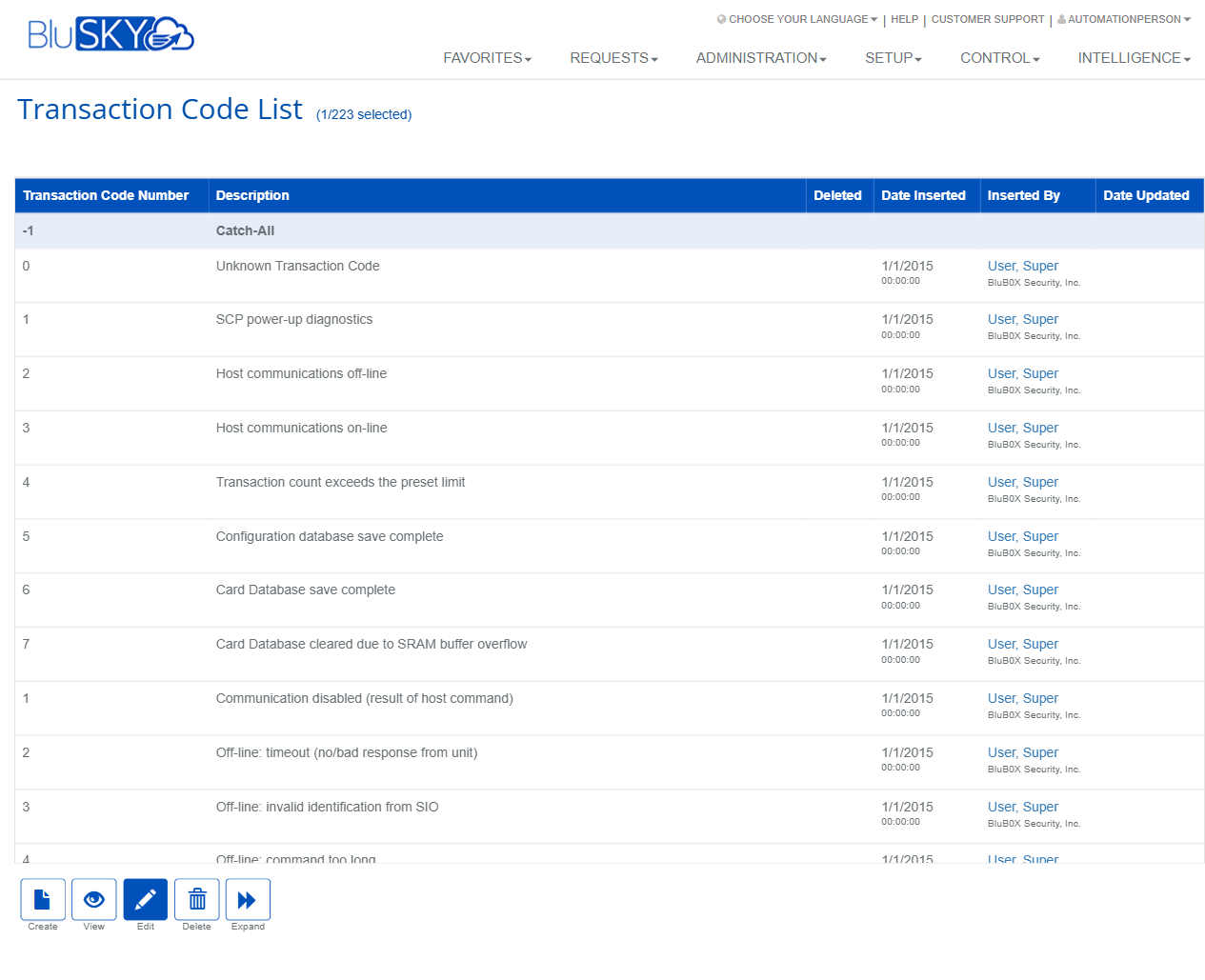
Transaction Code List
Screen Overview
The Transaction Code List screen provides a centralized lookup table for all Mercury transaction codes used by BluSKY to classify events received from controllers. Administrators can review seeded codes, add site-specific codes, update descriptions, and manage the list for reporting and alerting consistency. A dedicated Create Transaction Code form is used to add new codes.
Field Definitions
| Field Label | Definition | Notes |
|---|---|---|
| Transaction Code Number | The numeric identifier for a transaction/event from the Mercury controller. | Required on create. Integer. Must be unique. Negative values may be reserved (e.g., -1). |
| Description | Human‑readable label for the transaction code. | Required. Shown in logs, reports, and UI instead of the raw number. |
| Deleted | Indicates whether the record has been soft‑deleted. | Read‑only flag on the list. Deleted items are hidden from selection but remain for audit. |
| Date Inserted | Timestamp when the code was added. | Read‑only, system generated. |
| Inserted By | User who created the record. | Read‑only, links to the user profile when available. |
| Date Updated | Timestamp of the most recent update. | Read‑only, system generated. |
Screen Actions and Functions
- Create – Opens the Create Transaction Code form.
- View – Displays the selected transaction code in read‑only mode.
- Edit – Allows modification of the Description for the selected code. Some seeded codes may be locked from number changes.
- Delete – Soft‑deletes the selected code. The record remains for audit and historical reporting.
- Expand – Expands the list to a larger view and may reveal the filter/search bar depending on screen size.
- Back To List (Create form) – Returns to the Transaction Code List without saving.
- Create (Create form) – Saves the new transaction code and returns to the list.
Usage Instructions & Examples
How to review existing transaction codes
- Navigate to Setup > Lookup Tables > Mercury Transaction Codes.
- Use the list to scroll or, if available, use the filter/search bar after clicking Expand.
- Click View to see details for a specific code.
How to create a new transaction code
- Click Create on the Transaction Code List.
- Enter a unique Transaction Code Number.
- Enter a clear, user‑friendly Description (e.g., “9001 – Custom Alarm Received”).
- Click Create. The new code appears in the list and becomes available for reports and event views.
How to edit a transaction code description
- Select a code from the list and click Edit.
- Update the Description as needed.
- Save changes. The new description is reflected in future UI displays and reports.
How to delete a transaction code
- Select the record and click Delete.
- Confirm the action. The record is marked as Deleted and hidden from new selections but preserved for historical integrity.
System Behaviors and Edge Cases
- Uniqueness enforcement: Attempting to create a duplicate Transaction Code Number will be blocked.
- Reserved numbers: Some seeded numbers (e.g., -1 “Catch‑All”, 0 “Unknown Transaction Code”) are system defaults; their numbers cannot be changed.
- Soft delete only: Deleting a code sets the Deleted flag; historical event records continue to show the last known description or the raw number if the description is unavailable.
- Dependencies: Changing a description updates how future events appear in lists and reports; historical rows keep their stored text where applicable.
- Validation: Both Transaction Code Number and Description are required on create.
- Navigation availability: If a related lookup link (e.g., Mercury Action Types) returns HTTP 404, the resource may be disabled or not licensed for the tenant—contact Support.
Permissions
- Visible to users with access to Setup > Lookup Tables.
- Create, Edit, and Delete require administrative permissions (e.g., Global Administrator, System Integrator, or a role with Manage Lookup Tables/Transaction Codes rights).
- Users without write permissions can view the list but cannot modify records.
Linked Workflows
- Setup > Lookup Tables > Mercury Transaction Codes is typically maintained during commissioning or when integrating new event types.
- Codes are referenced by event ingestion, monitoring/alarm views, and analytics/reporting.
- May be used together with Mercury Transaction Types and Transaction Type Code Maps to normalize controller events.
Reference Image Links