Ips Groups
IPS Group
Screen Overview
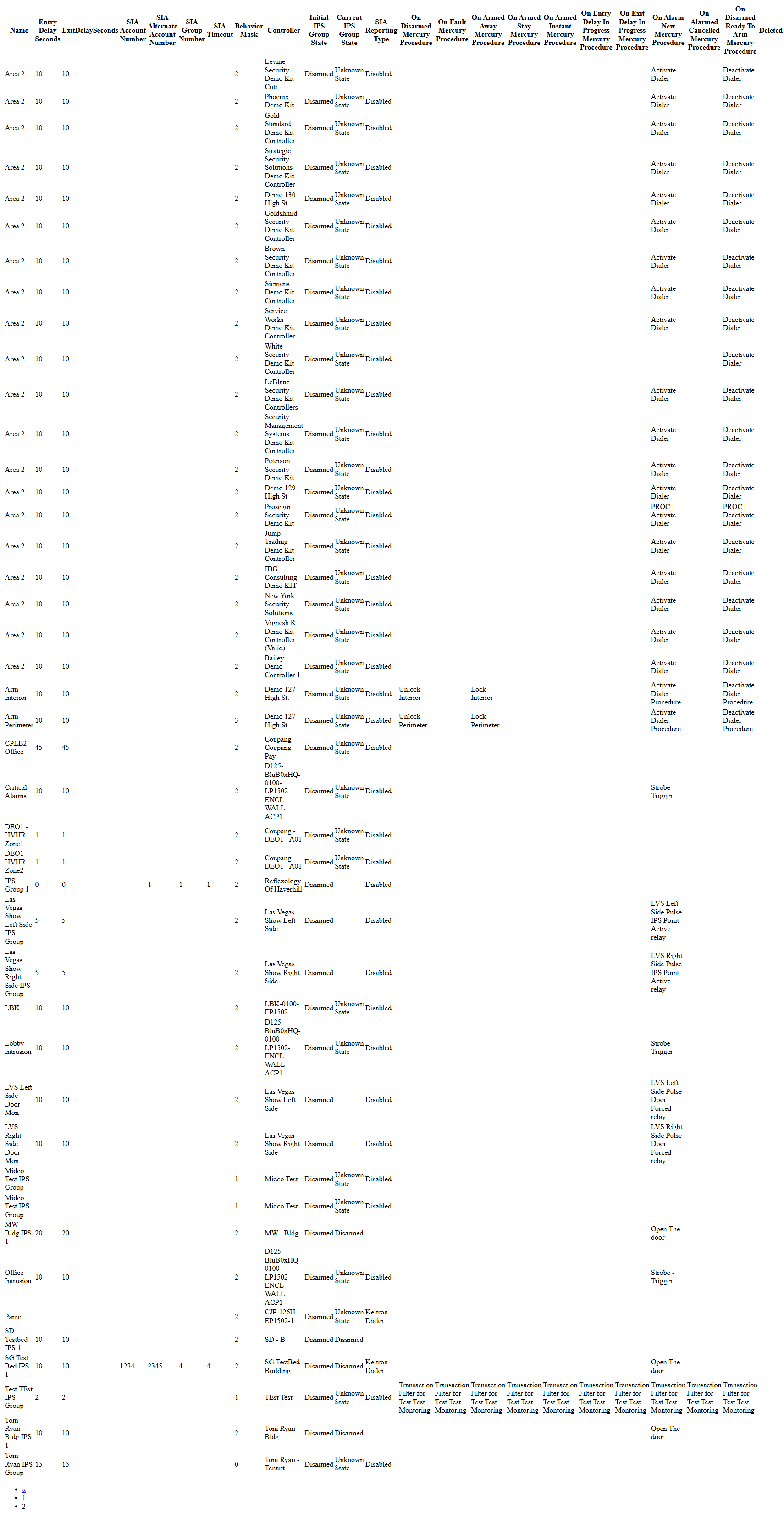
The IPS Group screens allow administrators to configure Intrusion/Perimeter Security (IPS) groups used for arming, disarming, and alarm handling. From the List view you can browse existing groups and from Create/Edit you define delays, initial state, SIA reporting details, and the Procedures that run when the group changes state or generates alarms.
Field Definitions
| Field Label | Definition | Notes |
|---|---|---|
| Controller | The hardware controller that hosts the IPS group. | Required. Determines which devices and Procedures are available. |
| Name | Display name of the IPS group. | Required. Must be unique within the controller. |
| Initial IPS Group State | Default state when the group is created or the controller is restarted. | Required. Typical values: Disarmed, Armed, etc. |
| Entry Delay Seconds | Delay (in seconds) allowed for entry before an alarm is generated. | Integer ≥ 0. 0 = no delay. Appears in list. |
| ExitDelaySeconds | Delay (in seconds) allowed for exit when arming. | Integer ≥ 0. 0 = no delay. Appears in list (label shown without spaces). |
| On Disarmed Procedure | Procedure to execute when the group transitions to Disarmed. | Optional. Runs after state change. |
| On Fault Procedure | Procedure to execute when the group goes Fault. | Optional. |
| On ArmedAway Procedure | Procedure to execute when the group arms in Away mode. | Optional. |
| On ArmedStay Procedure | Procedure to execute when the group arms in Stay mode. | Optional. |
| On ArmedInstant Procedure | Procedure to execute when the group arms in Instant mode. | Optional. |
| On EntryDelayInProgress Procedure | Procedure to execute when an entry delay starts. | Optional. |
| On ExitDelayInProgress Procedure | Procedure to execute when an exit delay starts. | Optional. |
| On AlarmNew Procedure | Procedure to execute when a new alarm is generated. | Optional. Often used to activate sirens, lock doors, or notify. |
| On AlarmedCancelled Procedure | Procedure to execute when an alarm is cancelled. | Optional. |
| On DisarmedReadyToArm Procedure | Procedure to execute when the group returns to ready-to-arm. | Optional. |
| SIA Reporting Type | Type of monitoring/reporting used for this group. | Options include Disabled, Dialer, Keltron, etc. Drives which SIA fields are required. |
| SIA Account Number | Monitoring station account number used for SIA reporting. | Required when reporting is enabled. Appears in list. |
| SIA Alternate Account Number | Secondary monitoring station account number. | Optional; used for alternate paths/receivers. Appears in list. |
| SIA Group Number | SIA group/partition number for the receiver. | Optional but commonly required by the receiver. Appears in list. |
| SIA Timeout | Communication timeout (seconds) for SIA reporting. | Integer ≥ 0. Required for some reporting types. |
| Automatically disarm group on valid access | If Yes, a valid credential at an associated portal disarms the group. | Default No. Use with caution; all events are logged. |
| Skip 'Alarm Cancelled' state and go to 'Disarmed' | If Yes, bypasses the intermediate Alarm Cancelled state. | Default No. Affects event history and Procedures. |
| Report transition from Disarmed-Ready-To-Arm to Disarmed-NOT-Ready to arm with 'IPS Change of State' | If Yes, generates an additional Change of State event on that transition. | Default No. Impacts auditing/notifications only. |
| Current IPS Group State | The group’s live state as reported by the controller. | Read-only column on the expanded list. |
| Behavior Mask | Internal code that summarizes the selected behavior options. | Read-only column on the expanded list; reflects the three behavior toggles. |
| Retain (per‑field) | Keeps the last value you entered for that field when creating multiple records. | Available next to several fields (e.g., Controller, Name, delays, SIA fields). Applies to the current user/session only. |
Screen Actions and Functions
- Create – Opens the Create IPS Group form.
- View – Opens the selected group in read-only mode.
- Edit – Opens the selected group for modification.
- Delete – Removes the selected group. System preserves audit history.
- Expand – Shows the full set of columns (controller, states, all Procedures, behavior mask, SIA details).
- Save – Commits changes on Create/Edit and returns to the record.
- Save + New – Saves and opens a blank form for the next group (respects Retain selections).
- Back To List – Returns to the IPS Group List without saving.
- Row selection and column sorting – Click a row to select; click column headers to sort.
- Pagination – Use the pager at the bottom of the expanded list to navigate long results.
Usage Instructions & Examples
How to create a new IPS Group
- Click Create on the IPS Group List.
- Select Controller and enter a unique Name.
- Choose Initial IPS Group State (e.g., Disarmed).
- Set Entry Delay Seconds and ExitDelaySeconds (e.g., 10 and 10).
- Optionally pick Procedures for each event (e.g., On AlarmNew Procedure = “Activate Siren”).
- If reporting to a monitoring station, set SIA Reporting Type and complete SIA Account Number, SIA Group Number, and SIA Timeout.
- Set behavior toggles as needed (e.g., Automatically disarm group on valid access = Yes).
- Click Save to finish, or Save + New to add another group.
Example: configure SIA reporting (Dialer)
- Edit the target group.
- Set SIA Reporting Type = Dialer.
- Enter SIA Account Number = 12345, SIA Group Number = 1, SIA Timeout = 45.
- Optionally set SIA Alternate Account Number for a backup receiver.
- Save. Events for this group will now be reported via SIA.
Quickly clone similar groups
- From Create, check Retain next to Controller, delays, and SIA fields.
- Click Save + New after each record.
- Only change the Name and any group-specific Procedures for each new entry.
System Behaviors and Edge Cases
- Required fields: Controller, Name, Initial IPS Group State. Save is blocked until these are provided.
- Entry/Exit delays must be non-negative integers; 0 creates immediate arming/alarm transitions.
- If SIA Reporting Type is Disabled, the SIA fields are ignored by the system.
- When SIA Reporting Type requires it (e.g., Dialer, Keltron), missing SIA Account/Group/Timeout will block saving.
- Changing Controller may refresh the available Procedure list to those valid for the new controller.
- Expand displays additional read-only columns including Current IPS Group State, all Procedure assignments, Behavior Mask, and SIA details.
- Delete may be blocked if the group is referenced by IPS points/areas or active policies. Remove dependencies first.
- The three behavior toggles update Behavior Mask in the expanded list and affect event generation and procedure execution order.
- Retain values persist for the current browser session and user only; they do not change system defaults.
Permissions
- Accessible to users with IPS configuration privileges, typically Global Administrators, Tenant Administrators, or Integrators.
- Edit and Create require “Manage IPS Groups” (or equivalent) permission.
- Delete requires a higher privilege such as “Delete IPS Groups.”
- Viewing the list may be allowed to security operators with read-only rights; SIA fields may be hidden based on role.
Linked Workflows
- After creating a group, associate IPS points/areas to it in the IPS configuration screens.
- Map Procedures referenced here to automation actions (door control, notifications, sirens).
- Use Schedules or Automation to arm/disarm groups at specific times.
- Monitor live state and alarms for these groups under Control > IPS/Alarms.
- Pair with access control rules to optionally disarm on valid access.
Reference Image Links